I’ve been around the Linux block enough times to know the biggest hurdle isn’t learning a new desktop—it’s saying goodbye to the Windows apps that still have a chokehold on your workflow. Some programs make the jump to Linux without a hitch, but sooner or later you hit an app that simply refuses to play ball. That’s where WinBoat enters the ring, promising to run Windows applications—and even a full Windows desktop—on Linux with a setup that sounds almost too good to be true. As of early 2026, WinBoat is still an active-development project, and after digging into how it works, the short version is this: the idea is brilliant, the execution is still rough around the edges, and I’m not ready to hand it a permanent spot on my machine.
WinBoat is a free, open-source Electron application for Linux that uses a containerized approach to run Windows apps. Under the hood, it runs a Windows virtual machine inside a Docker container. It uses its own WinBoat Guest Server to pull data from the Windows VM, then displays GUI applications through FreeRDP on the Linux side and Windows’ RemoteApp protocol on the virtual machine. In plain English, WinBoat is trying to make Windows feel like a native part of Linux—no clunky VM window staring back at you, no constant desktop switching, and no ceremony just to open one program.
That pitch is exactly why WinBoat has been stealing the spotlight. Once it’s set up, you can launch individual Windows applications without dealing with a full Windows desktop. You can still access the desktop if you want, but it isn’t a requirement. Your Linux home directory is mounted inside Windows, which makes file sharing much less of a headache. WinBoat also advertises smartcard passthrough, resource monitoring, and more features as development continues. On paper, it’s a clever answer to a very old Linux problem.
But here’s the rub: installing WinBoat itself can be a real slog if you’re not already comfortable with Docker. The requirements aren’t outrageous, but they’re not exactly “click next, next, finish” either. You need at least 4GB of RAM, at least 2 CPU cores, virtualization enabled in the BIOS, Docker, Docker Compose v2, your Linux user added to the Docker group, the Docker daemon running in the background, and FreeRDP version 3 or higher. If you’ve never set up Docker on Linux before, WinBoat’s instructions should get you most of the way there—but expect a few surprises, and most of them will probably come from Docker rather than WinBoat itself.
| Requirement | What it means in practice |
|---|---|
| 4GB RAM minimum | Enough to boot Windows, but not much breathing room |
| 2 CPU cores minimum | Basic apps may run; heavier software will feel it |
| KVM enabled | Virtualization must be on in BIOS |
| Docker + Compose v2 | The backbone of WinBoat’s containerized setup |
| Docker group + daemon | Common tripwire for first-time Docker users |
| FreeRDP 3+ | Needed for the remote app display layer |
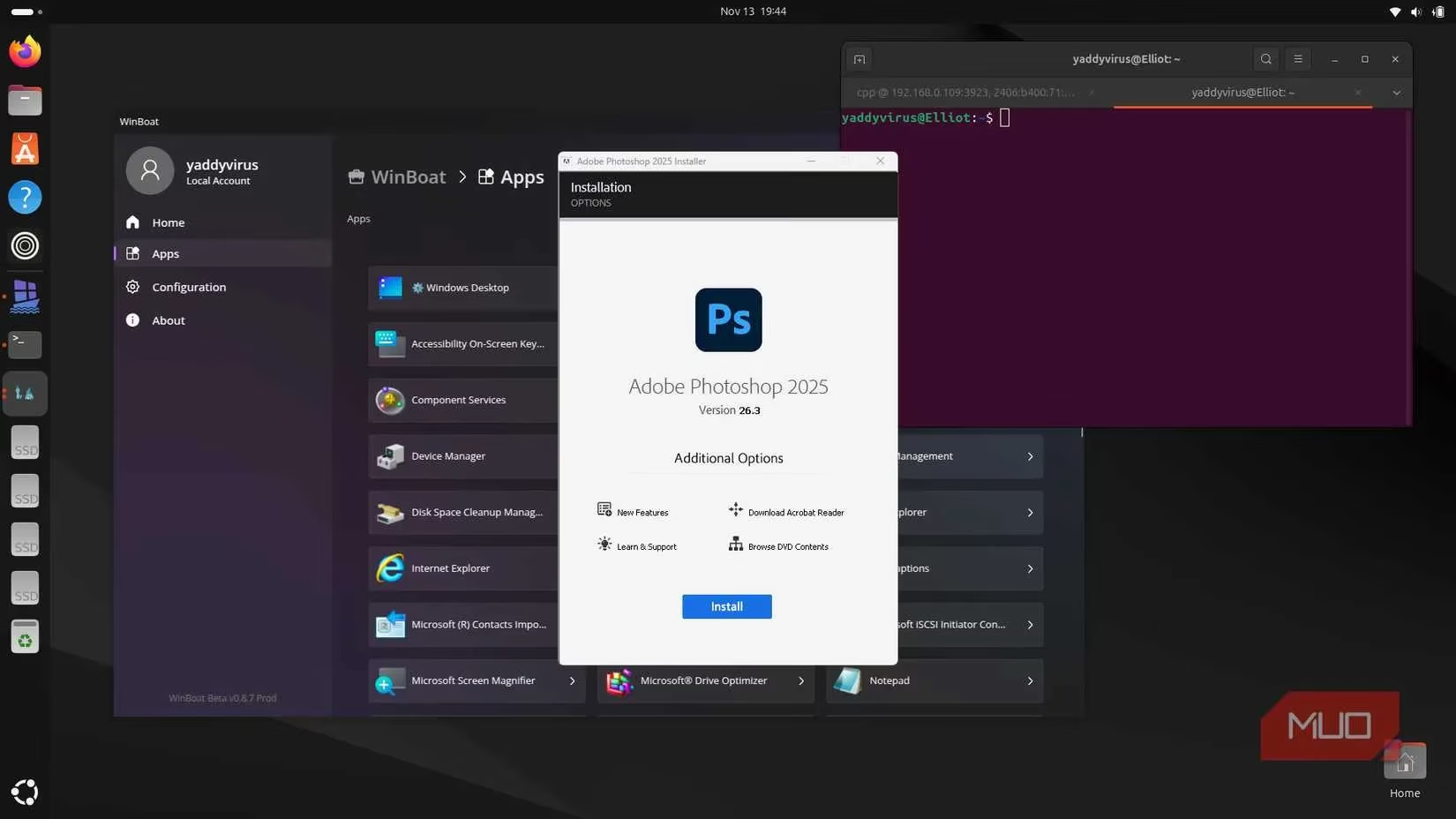
I tested WinBoat on an Ubuntu host with an Intel Core i5 9300H, a 4GB GTX 1650Ti GPU, and 16GB of RAM. I gave the Windows VM 4GB of RAM, 4 CPU cores, and 40GB of storage. Those specs are modest for Windows 11, but they’re realistic for people who don’t want to sacrifice their entire Linux machine to a VM. The setup itself was fairly simple once the requirements were met: WinBoat installed my Windows version of choice automatically, and I could monitor progress in a browser tab. After that, the Apps tab became the main hub for launching Windows programs.
Performance, however, didn’t blow my mind. It certainly didn’t feel like the Windows programs were running natively. Some apps worked better than others, but occasional hiccups were part of the deal unless you have a powerful PC. There’s also no proper windowed mode—the window keeps scaling to full screen, which is a small thing that quickly becomes annoying. Photoshop ran fine for the most part, which genuinely surprised me. Getting Adobe programs to run on Linux has been one of my biggest roadblocks to fully adopting Linux, so seeing Photoshop work with usable performance on modest hardware felt like a small victory.
Then I hit the wall that defines WinBoat’s current reality: no GPU passthrough. My GTX 1650 Ti was detected flawlessly by Ubuntu, but it was nowhere to be found inside the Windows VM. Photoshop warned that the GPU wasn’t supported but still ran. Premiere Pro and Lightroom refused to launch at all. Audio support is still experimental. Games? Forget about it. I got Steam and even the Xbox app installed, but none of the games I tested would start. Most threw DirectX errors because the integrated GPU was far too old for modern titles. That’s a dealbreaker for anyone hoping WinBoat will double as a gaming solution.
So where does that leave us in 2026? WinBoat has real potential. If the team can iron out the performance quirks, add GPU passthrough, and make Docker setup less of a minefield, it could become an incredibly handy way to run Windows programs on Linux with a near-native feel. But right now, I just can’t recommend it as a daily driver. For regular Windows programs, Wine is still the better bet. For gaming, Valve’s Proton compatibility layer has done serious work, and a gaming-focused Linux distro will give you much more bang for your buck. WinBoat might become the favored way to run Windows apps on Linux one day. Until then, I’ll stick with Wine, Proton, or—when I really need it—Windows itself. The jury is still out, and I wouldn’t hold my breath for a flawless experience just yet. 😅
Leave a Comment