Windows 11 has matured significantly since its 2021 debut, yet power users still encounter frustrating limitations. The minimalist context menu hides useful options, ads infiltrate the Start menu and lock screen, and automatic updates run unchecked. While numerous third-party utilities address these issues individually, juggling multiple apps quickly becomes tedious. Enter Winaero Tweaker—a free, comprehensive solution that consolidates dozens of system tweaks into a single, user-friendly interface. In 2026, it remains the most effective way to reclaim control over Windows 11 without diving into the registry or wrestling with PowerShell.
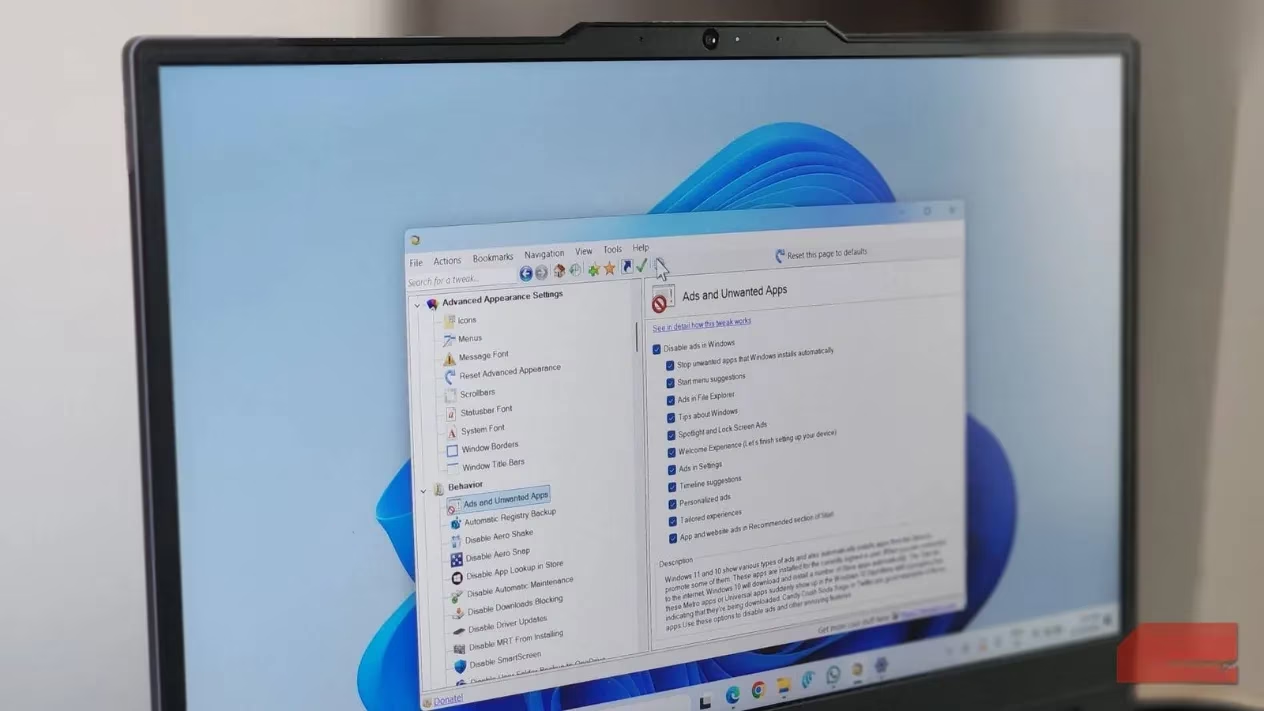
The tool's philosophy is simple: every tweak is presented as a checkbox or a short setting, organized into logical categories. Users simply search for the desired change, tick the box, and restart Explorer if needed. No complex scripts, no obscure commands—just immediate results. This ease of use is why Winaero Tweaker feels like a feature that should have shipped with Windows itself.
Restoring the Classic Context Menu
One of the most common complaints about Windows 11 is its truncated right-click menu. While aesthetically pleasing, it buries essential options like "Open with" and "Send to" behind a "Show more options" button. Winaero Tweaker resolves this in under a minute. Navigating to Classic Full Context Menu and checking the box restores the full Windows 10-style menu. Users can further customize the right-click menu by adding entries such as Create Restore Point, Kill Non-Responsive Apps, or shortcuts to Task Manager, Command Prompt, and Snipping Tool. This level of customization transforms a daily annoyance into a productivity boost.
Eliminating Ads and Unwanted Apps
Windows 11 is notorious for injecting advertisements into the Start menu, lock screen, notifications, and even File Explorer. Winaero Tweaker's Behavior > Ads and Unwanted Apps section provides a comprehensive list of checkboxes to disable every type of ad Microsoft sneaks in. From suggested apps in the Start menu to "tips" on the lock screen, users can silence them all with a few clicks. This not only declutters the interface but also respects user privacy and attention.
Controlling Updates and Telemetry
Automatic Windows and driver updates can interrupt workflows and introduce unwanted changes. Winaero Tweaker offers options to disable both via Behavior > Disable Windows Update and Disable Driver Update. For privacy-conscious users, the tool also includes a toggle to turn off Telemetry, preventing Windows from sending diagnostic and usage data to Microsoft. These features are particularly valuable in enterprise environments or for users who prefer to manage updates manually.
Disabling Web Search in the Start Menu
Windows 11's search menu often returns web results through Bing in Edge, regardless of the default browser. This becomes irritating when a simple typo—like "Nottpad" instead of "Notepad"—launches a browser window. Winaero Tweaker includes an option to disable web searches entirely, ensuring the Start menu remains a local, focused tool. This small change significantly improves the search experience for users who rely on it for launching applications.
Bypassing the "Let's Finish Setting Up Your Device" Screen
After major updates, Windows displays a full-screen prompt urging users to sign in with a Microsoft account, enable OneDrive, and set Edge as default. While well-intentioned, this screen is often redundant and intrusive. Winaero Tweaker allows users to disable it completely, streamlining the post-update experience. This tweak is especially welcome for those who prefer local accounts and third-party services.
Bringing Back Classic Apps and Features
Beyond disabling modern annoyances, Winaero Tweaker resurrects beloved legacy features. Users can restore the Windows Photo Viewer, the old Notepad, Windows 7 Games, and even desktop widgets. The tool also enables the classic ribbon interface in File Explorer, restricts background apps, adjusts window borders, and speeds up animations. These options cater to nostalgia and practicality, allowing users to tailor Windows 11 to their exact preferences.
User-Friendly Interface and Portability
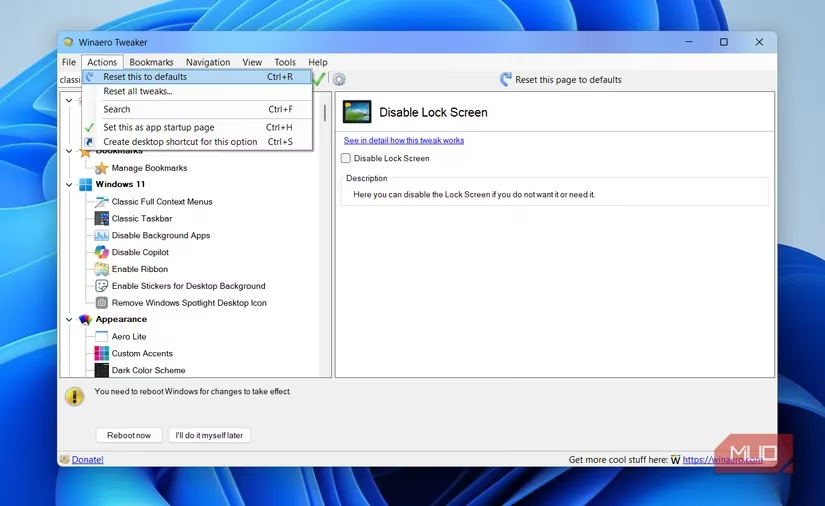
The application's layout is both simple and logical. On the left, tweaks are grouped into categories like Appearance, Behavior, File Explorer, and Context Menu. On the right, each tweak includes a short description, so users always understand the change they are making. Favorites can be bookmarked, and a search bar provides quick access. For those managing multiple PCs, Winaero Tweaker supports exporting and importing preferences, making it easy to replicate a customized setup across machines.
Safety and Reset Options
Applying many tweaks can feel risky, but Winaero Tweaker includes a safety net: a one-click reset that reverts all changes to their default state. This feature encourages experimentation without fear of permanently breaking the system. Additionally, the tool does not modify system files directly; it leverages official Windows APIs and registry keys, ensuring stability and compatibility.
A Must-Have for Windows 11 Power Users
In 2026, Windows 11 continues to evolve, but many of its core frustrations persist. Winaero Tweaker remains the most comprehensive, free, and accessible solution for addressing them. It doesn't reinvent the wheel; it simply gives users back the control that Microsoft gradually removed. Whether one wants to restore the classic context menu, block ads, disable telemetry, or bring back legacy apps, Winaero Tweaker delivers. For anyone who values efficiency and customization, this tool is an essential addition to any Windows 11 installation.
| Feature Category | Key Tweaks |
|---|---|
| Context Menu | Classic full menu, custom right-click entries |
| Ads & Bloat | Disable Start menu ads, lock screen tips, notifications |
| Updates | Disable Windows Update, driver updates |
| Privacy | Turn off telemetry |
| Search | Disable web results in Start menu |
| Setup Screen | Bypass "Let's finish setting up" prompt |
| Legacy Apps | Photo Viewer, old Notepad, Windows 7 Games |
| Interface | Ribbon in File Explorer, window borders, animations |
With its intuitive design, export/import capabilities, and global reset, Winaero Tweaker stands out as a polished, reliable utility. It transforms Windows 11 from a locked-down experience into a personalized, efficient workspace—no registry editing required. ✅
Leave a Comment