Windows File Explorer remains the backbone of file management for millions of users, yet its built-in capabilities often feel incomplete. Even with tabs, cloud integration, and search enhancements, everyday tasks like organizing digital assets, handling stubborn file locks, and viewing specialized document types can quickly become friction points. Instead of replacing the familiar explorer shell, power users have discovered a transformative solution from Microsoft itself: PowerToys. This continuously evolving utility suite extends File Explorer\u2019s functionality in ways that eliminate routine frustrations, streamline workflows, and bring macOS-like convenience to the Windows environment. Whether you work with large image libraries, complex project structures, or simply want to stop guessing which program has hijacked a file, PowerToys equips File Explorer with the polish it has always deserved.
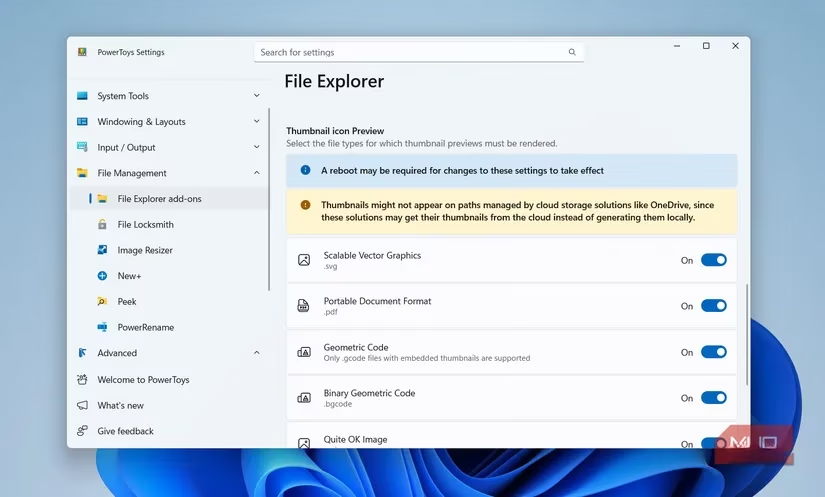
The default thumbnail engine in File Explorer performs admirably for common media formats\u2014photos, videos, and folders receive crisp preview icons. However, critical business documents like PDFs, scalable vector graphics (SVGs), and raw image types often appear as lifeless generic symbols, forcing users to open each file just to identify its contents. The alternative Preview Pane does offer a glimpse, but at the expense of screen real estate, making navigation feel cramped. PowerToys resolves this with a dedicated \u201cFile Explorer add-ons\u201d module that injects high-fidelity thumbnail previews for PDFs, SVGs, QOI images, and dozens of other formats directly into the icon view. The same extension also supercharges the Preview Pane, adding seamless rendering for markdown notes, source code files, and additional specialty formats\u2014restoring visual context without clutter.
A standout tool for rapid content inspection is the Peek feature, which mirrors the instant file glance found in macOS Finder. Rather than launching resource-heavy applications just to verify a file\u2019s identity, users can select any item and press Ctrl + Space to summon a large, centered preview overlay. Peek handles images, video clips, PDFs, Office documents, and a broad spectrum of other formats with instant responsiveness. The preview dismisses itself the moment it loses focus\u2014simply clicking elsewhere closes it\u2014keeping the workflow swift and uninterrupted. For photographers sorting through hundreds of shots, accountants reviewing invoices, or developers scanning code snippets, Peek eliminates the constant shuffle between File Explorer and external viewers, making file identification almost frictionless.
Batch renaming in vanilla File Explorer is notoriously primitive: selecting multiple files and hitting rename merely appends a numeric suffix in parentheses, offering no control over naming conventions, casing, or structure. PowerToys\u2019 PowerRename tool replaces this rigidity with a comprehensive renaming engine. After highlighting a group of files and choosing \u201cRename with PowerRename\u201d from the context menu, a dedicated interface opens, presenting a search-and-replace expression builder, a live preview pane, and granular options. Users can replace substrings, insert sequential numbering with configurable start values, convert entire filenames to lower or upper case, trim specific character counts, or even apply regular expressions for advanced pattern matching. The live preview ensures that every intended change is visible before committing, eliminating costly mistakes. In 2026, PowerRename has grown even smarter, remembering frequently used renaming patterns so that complex standardization tasks\u2014like delivering client assets with consistent naming\u2014can be executed in one right-click.
For creative professionals and digital packagers, the Image Resizer tool brings one-click scaling directly into File Explorer. Instead of opening heavyweight editing software or trusting privacy-questionable online converters, users can select any collection of images, right-click, and choose \u201cResize with Image Resizer.\u201d A clean dialog presents preconfigured size presets (small, medium, large, phone, custom) and allows exact pixel dimensions or percentage scaling. The tool automatically renames the resized copies while preserving original files, and it can replace the originals if desired. It also supports encoding options like converting PNG to JPEG to reduce file size. For teams preparing marketing collateral or individuals emailing photo collections, Image Resizer turns a potentially tedious manual process into a single command, all within the familiar explorer environment.
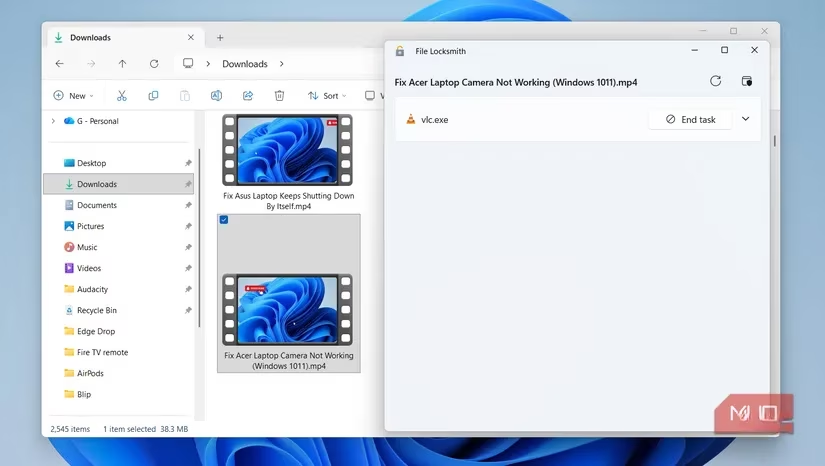
The infamous \u201cFile in use\u201d error message has plagued Windows users for decades, often appearing when attempting to move, delete, or rename a document stubbornly held by an unknown background process. Previously, the solution involved blind guessing\u2014closing applications one by one or rebooting the entire machine. PowerToys\u2019 File Locksmith cuts through this mystery with surgical precision. After right-clicking the locked file and selecting \u201cFile Locksmith,\u201d a sleek panel enumerates every process currently accessing the file. From there, users can instantly kill the offending task if it\u2019s safe to do so, freeing the file without disrupting unrelated workflows. This feature alone can save IT support teams and everyday users countless hours of frustration, and it integrates so naturally into the right-click menu that it feels like a long-overdue native Windows capability.
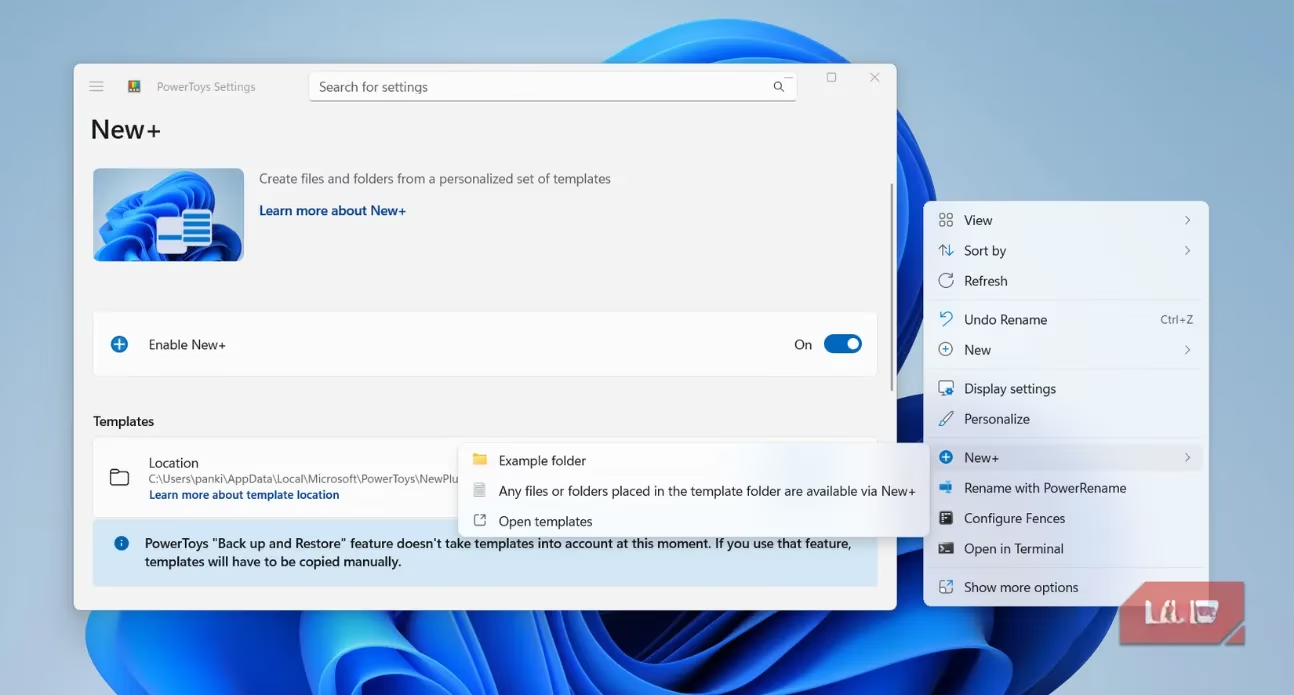
Beyond fixing existing files, PowerToys enables users to create new content faster with the New+ feature. The stock Windows \u201cNew\u201d context menu permits only blank, generic documents and folders. New+ transforms that menu into a personalized template launcher. Users can designate any existing file\u2014a pre-formatted Excel budget template, a branded Word report with company headers, a Photoshop canvas with predefined layers, or even an entire folder hierarchy for new project kick-offs\u2014and register it as a reusable template. Right-clicking an empty spot, hovering over \u201cNew+,\u201d and selecting the appropriate template instantly copies that customized resource into the current directory. This eradicates repetitive file setup and ensures consistency across teams. For example, a marketing department might maintain templates for social media graphics, campaign trackers, and press release drafts, all accessible through the right-click menu without cluttering the desktop or navigating shared drives.
These File Management enhancements represent only a fraction of the PowerToys ecosystem. The suite also includes tools for keyboard remapping, a system-wide color picker for designers, a screen ruler for on-the-fly measurements, Always On Top to pin windows above others, and Awake to prevent the PC from sleeping during long-running tasks. Each utility is lightweight, open-source, and actively maintained by Microsoft and community contributors, ensuring compatibility with the latest Windows builds in 2026. Collectively, they elevate File Explorer from a passive container of files into an active productivity hub, allowing users to preview, rename, resize, unlock, and generate content with minimal context switching.
Adopting PowerToys does not require abandoning existing habits or learning an entirely new interface; enhancements appear in the same right-click menus, keyboard shortcuts, and explorer windows that users already interact with daily. Configuration is centralized in an intuitive dashboard where each module can be toggled on or off independently and fine-tuned to match personal or organizational workflows. As digital workloads expand and file management grows more complex, PowerToys proves that the best Windows companion is sometimes the one Microsoft already built\u2014you just need to unlock its full potential.
Leave a Comment