As a gamer, my PC is my sanctuary. It's where I compete, create, and unwind. Yet, for years, a quiet unease lingered in the background of every session. The feeling that my digital fortress wasn't entirely my own, that my operating system was a chatty informant, constantly whispering my habits back to its creators. Privacy has always been my top priority before installing any software, a non-negotiable line in the sand. And let's be honest: Windows is not a beacon of privacy. I've wrestled with it, tried countless tools, and often felt like I was applying band-aids to a system designed to bleed data. Many promised solutions came with bloated installers, cryptic background services, and vague explanations about what they were actually changing. Then, in late 2025, I approached O&O ShutUp with deep skepticism. What I found wasn't just clever marketing; it was a revelation—a direct line to the deepest, most hidden levers of Windows privacy control. It has since become my indispensable tool for silencing Windows telemetry and reclaiming my machine.
Data collection on Windows is a layered, pervasive beast. It operates through diagnostics, activity history, system services, and a web of cloud-connected features. Sure, the Settings app has its privacy toggles, but they feel like a polite suggestion box. They often disable a visual feature on the surface while the underlying data river continues to flow unseen. I've tried premium privacy suites, but they typically operate at a higher level, focusing on browser tracking or network firewalls. They're great for stopping external threats, but they don't dare to interact with Windows' own internal telemetry policies, its scheduled tasks, or its diagnostic subsystems. O&O ShutUp's approach is fundamentally, brilliantly different. It doesn't abstract privacy; it gives you a master key to Windows' native configuration points. It's not about filtering traffic after it's generated; it's about telling Windows not to generate that traffic in the first place.
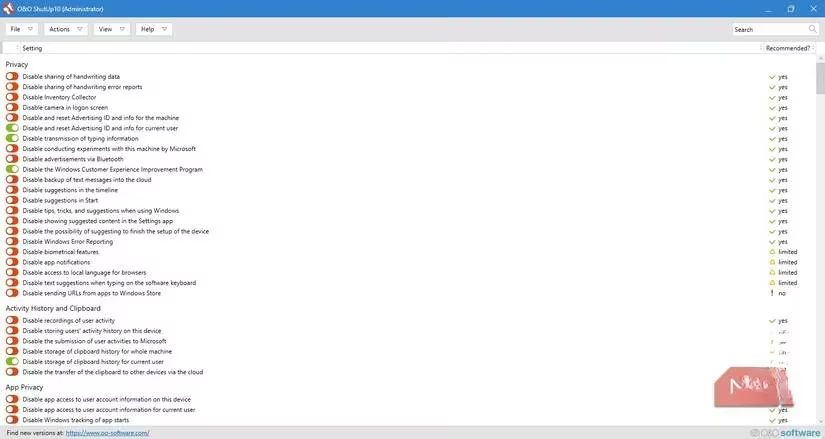
What truly won me over was the granular control over elements Windows seems to treat as non-negotiable. The tool cuts through them all. It lets me manage system-wide and user-specific diagnostic data submission with a precision I'd never seen before. We're talking about disabling feedback prompts that pop up at the worst times, shutting down automatic error reporting, and halting background diagnostic uploads. These aren't app-specific tweaks; they are changes that alter how the operating system itself behaves, severing entire categories of telemetry at the source. One of my favorite features is how it handles the link between Windows Update and tracking. As a gamer, stable drivers are crucial, but I don't want automatic updates contributing to a device profile. O&O ShutUp lets me shut down automatic driver updates and peer-to-peer update sharing—two "convenience" features that are significant privacy leakers. Most paid services avoid the update mechanism entirely, but this tool rightly treats it as a core part of the privacy puzzle.
Then there are the deeply invasive features that sound benign. Microsoft SpyNet and Defender reporting are prime examples. 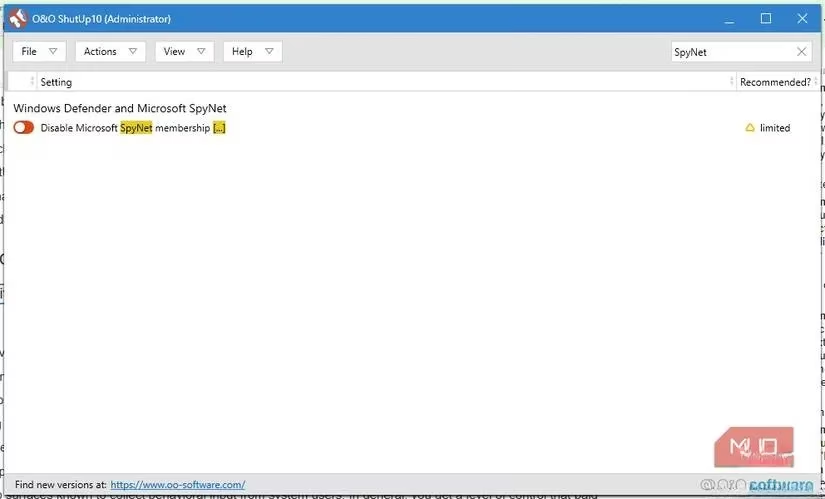 O&O ShutUp exposes them clearly and provides straightforward toggles to opt out of SpyNet membership and prevent my PC from submitting malware samples or detailed infection reports to Microsoft. It fundamentally changes how Windows Defender communicates with the outside world. Activity History is another major data vector. The tool allows me to disable activity recording entirely, which stops telemetry on two fronts: it prevents uploads to Microsoft's servers and halts cross-device syncing. The level of control extends to granular settings for clipboard history and typing data—surfaces known to collect behavioral insights. This is a depth of control that premium tools I've tested don't even hint at offering.
What surprised me, though, was how far beyond the OS core it goes. O&O ShutUp tackles the privacy implications of Microsoft's bundled applications, which is where a staggering amount of tracking occurs. It offers options to:
-
Disable online speech recognition.
-
Prevent cloud-based search integration.
-
Block web results in the desktop search, effectively turning bundled apps into local-only features.
This philosophy applies powerfully to apps like Microsoft Edge. I get individual controls for:
| Control Category | What It Manages |
|---|---|
| Browser Data | Usage data, website tracking, and SmartScreen filtering. |
| Personal Data | Form autofill and credit card storage preferences. |
| System Integration | Options to remove ads and suggestions from Windows Explorer and the Start menu. |
As someone who has never been a fan of OneDrive and refuses to sync my desktop to it, the ability to turn off its integration at a system level is a godsend. 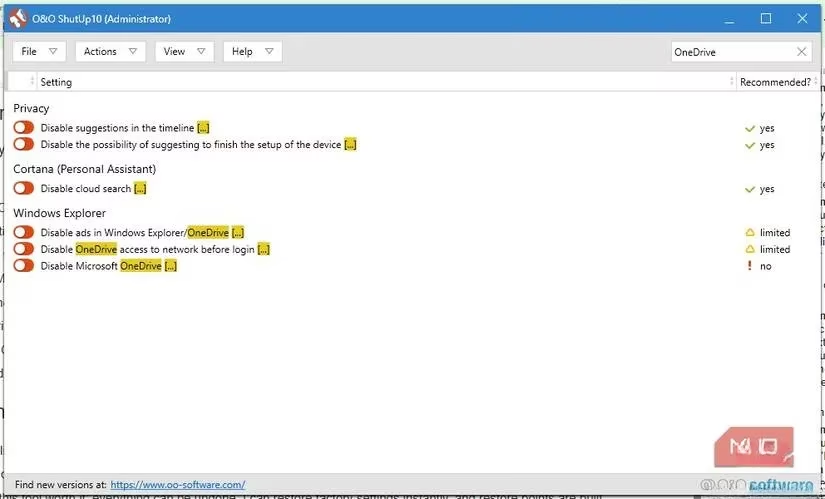
Privacy changes can feel like a gamble. You're never quite sure what you might break. This is where O&O ShutUp shines with unparalleled transparency. Every setting is explained, and its potential effects are shown. When I make a change, I'm not relying on blind optimization; I'm making an informed, deliberate choice about my system's behavior. And the ultimate safety net? Everything can be undone. I can restore factory settings instantly with a single click, and the tool has built-in restore points. It gives you profound control, including the absolute control to take it all back. For those who want even more granularity, the Plus edition offers deeper customization. For me, in 2026, it's no longer just a tool; it's the foundation of a private, performant, and truly personal gaming setup. It turned my skeptical approach into a trusted ritual, ensuring my sanctuary remains mine alone.
Leave a Comment