Keyloggers continue to pose a severe security risk well into 2025, enabling attackers to harvest sensitive data like account passwords and financial details through covert surveillance. These insidious spyware programs record every keystroke, capture clipboard data, monitor application usage, and even take random screenshots—transmitting everything to remote attackers. While sometimes used legitimately as employee monitoring tools, their malicious application for data theft remains widespread, demanding constant vigilance from users worldwide. Understanding their operation, infection vectors, and detection methods is paramount for personal cybersecurity hygiene.

Understanding Keylogger Mechanics
Keyloggers operate as stealthy digital spies. Once installed, they silently log every key pressed on a keyboard, capturing:
-
🔑 Login credentials and passwords
-
💳 Credit card numbers and financial data
-
✂️ Clipboard contents (copied text/images)
-
📂 Documents opened and applications used
They primarily exist in two forms:
-
Hardware Keyloggers: Physical devices embedded in PC hardware or inserted between the keyboard and USB port. Installation requires physical access, making them less common.
-
Software Keyloggers: Malicious programs installed remotely without physical access. These are the predominant threat today.
Common Infection Vectors in 2025
Keyloggers infiltrate systems through deceptive means:
-
🕸️ Malicious Websites: Drive-by downloads from compromised or fake sites.
-
📧 Phishing Emails: Clicking malicious links or opening infected attachments.
-
💾 Infected USB Drives: Plugging in compromised external storage.
-
🧠 Social Engineering: Tricking users into downloading malware via fake alerts or offers.
-
⚠️ Cracked Software: Bundled with pirated programs downloaded from untrustworthy sources.
Detecting a Keylogger Infection
Suspect a keylogger? Here’s how to investigate:
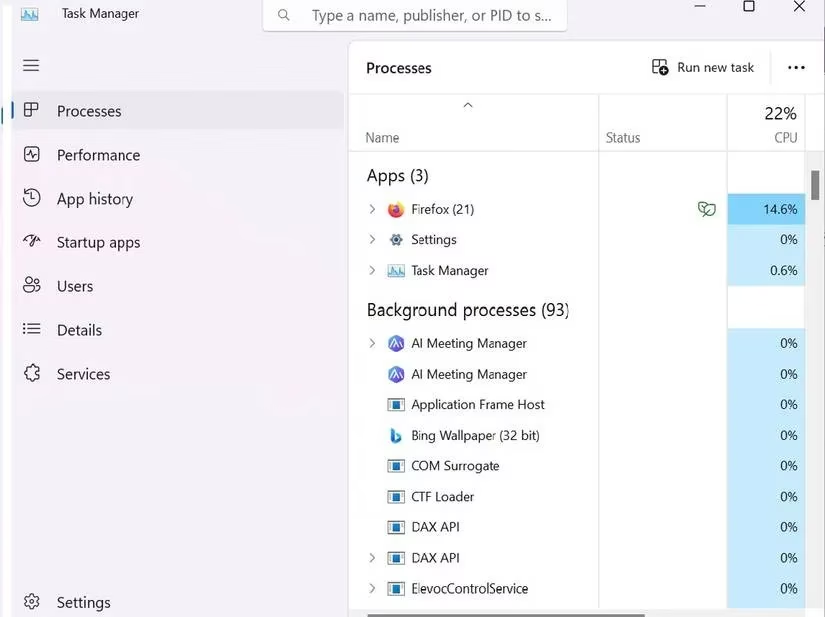
1. Scrutinize Running Processes via Task Manager
Task Manager reveals active applications and background processes—a prime location to spot suspicious activity.
-
Press
Windows + X, selectTask Manager. -
Navigate to
Processes. -
Investigate unknown or resource-heavy processes. Research them online; disable if confirmed malicious.
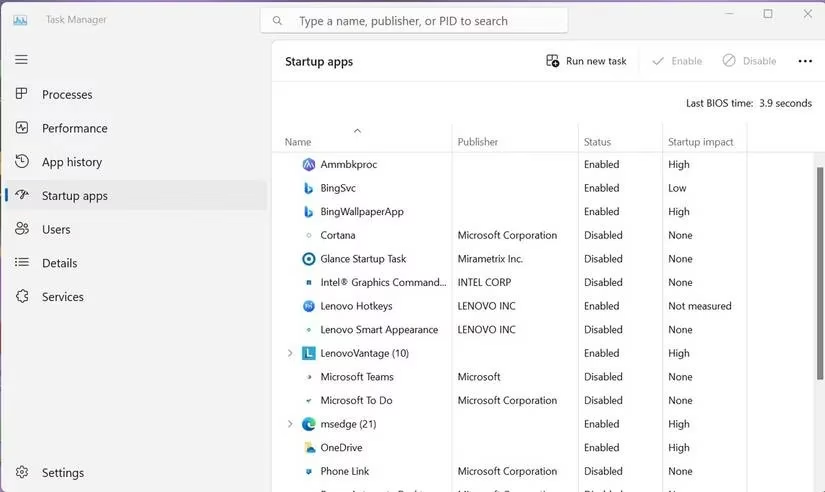
2. Audit Startup Applications
Keyloggers often auto-start with Windows.
-
In Task Manager, go to the
Startup appstab. -
Identify and research unfamiliar apps. Disable unnecessary or dangerous entries.
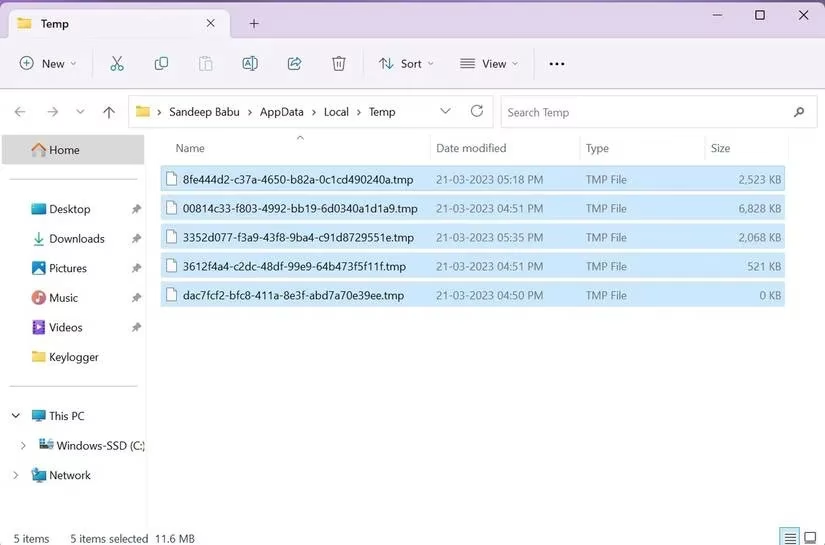
3. Clean Temporary Files
Malware often hides in temp folders to evade detection.
-
Close all programs.
-
Press
Windows + R, type%temp%, clickOK. -
Select all files and delete them. This removes potential hiding spots.
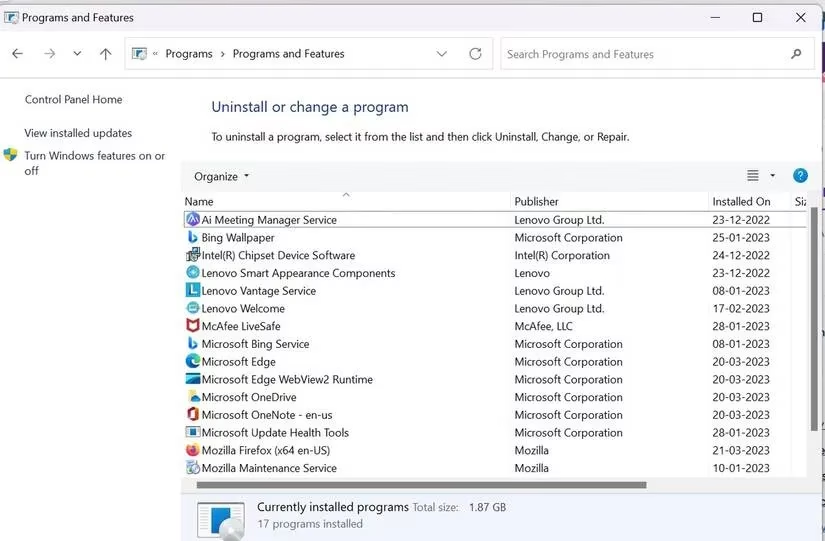
4. Review Installed Programs
Check for unrecognized software installations.
-
Press
Windows + R, typecontrol, pressOK. -
Go to
Programs > Programs and Features. -
Uninstall any suspicious or unknown programs after online verification.
5. Monitor Network Traffic
Keyloggers transmit data, creating unusual network connections. Use built-in resource monitors or third-party network analysis tools to spot unexpected outbound traffic.
6. Conduct Comprehensive Antivirus Scans
Reputable security software remains the most effective detection tool.
-
Update & Scan: Run a full system scan with updated antivirus/anti-malware software. Paid solutions often offer superior anti-keylogger features compared to basic Microsoft Defender.
-
Removal: Follow the software's instructions to quarantine or delete detected keyloggers.
-
Last Resort: If infection persists, a factory reset erases everything—including the keylogger. ⚠️ Crucially back up essential files first!
Essential Prevention Strategies for 2025
Proactive defense is key against these persistent threats:
-
🛡️ Deploy Robust Security Software: Invest in reputable antivirus/anti-malware with dedicated anti-keylogger capabilities. Keep it updated!
-
🔒 Practice Safe Browsing & Downloading:
-
Only download software from official, trusted sources.
-
Avoid clicking links or opening attachments in unsolicited emails.
-
Be wary of "too good to be true" offers or urgent security alerts.
-
-
⌨️ Utilize Virtual Keyboards: Input sensitive data (like passwords or credit card numbers) using your security software's or OS's on-screen virtual keyboard. This bypasses physical keyloggers targeting QWERTY layouts.
-
📋 Employ a Password Manager: These tools auto-fill credentials, eliminating manual typing that keyloggers capture. They also prevent passwords from being displayed on-screen.
-
🔄 Maintain System Updates: Regularly update your operating system and all software to patch vulnerabilities attackers exploit.
-
🔍 Stay Vigilant: Be cautious with USB drives from unknown sources and practice skepticism online.
While no single method guarantees absolute safety, combining these strategies significantly reduces the risk of falling victim to a keylogger attack. Regular system checks and maintaining strong security hygiene are non-negotiable practices in today's digital landscape to safeguard your most valuable data from these silent spies and other evolving threats like FormBook malware.
Leave a Comment