In 2026, a Windows PC can still feel like it is aging in dog years. Startup times stretch, files scatter across the drive, and the whole experience turns sluggish. The culprit? Digital junk that accumulates over time—temporary files, browser clutter, leftover installers, and background processes. Before a user drags their desktop to a repair shop, they should know that a stack of free tools can clean, optimize, and boost Windows without touching their wallet. Who would not want a faster PC and a fuller wallet at the same time?
Not all Windows bloat is harmful, but plenty of it makes performance worse. The good news is that free optimization tools have matured. Some focus on simplicity, others on privacy, and a few pack enough features to replace a dozen utilities. Here is a look at the best options for 2026, based on what they actually do well.
The Familiar Starting Point: CCleaner
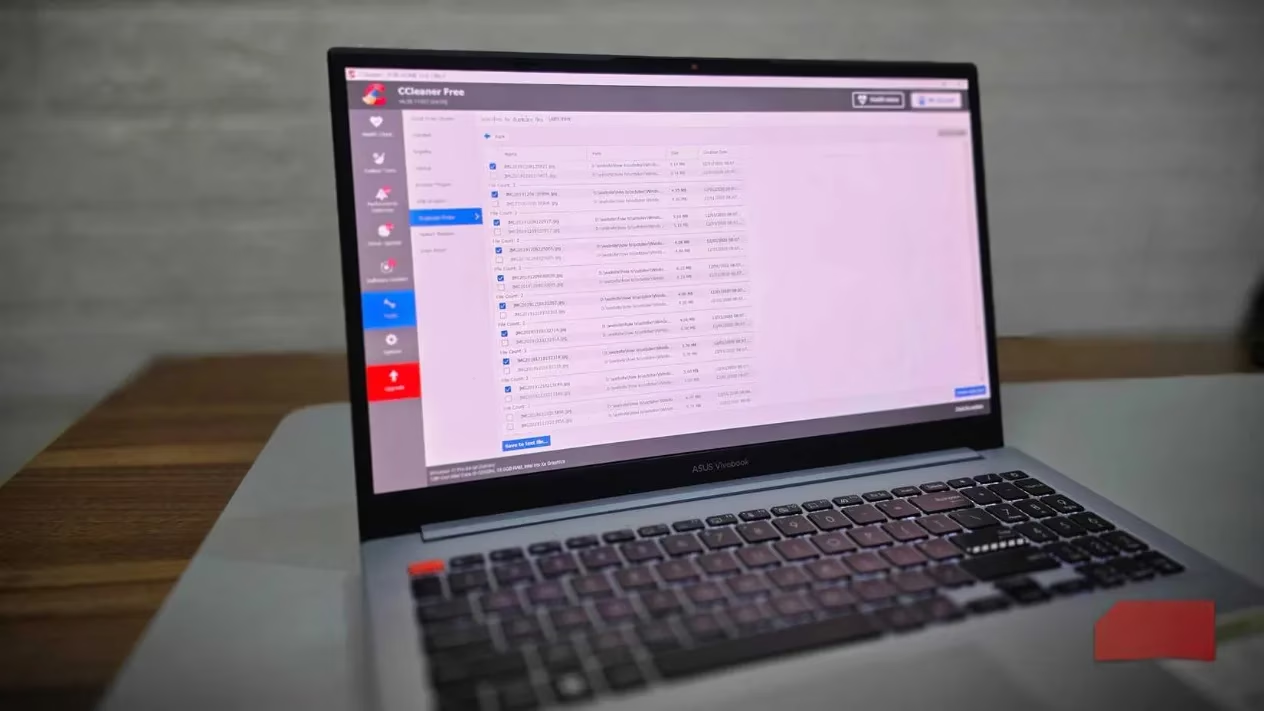
Anyone who has searched for PC optimization software has probably heard of CCleaner. It might not be the absolute best system cleanup tool, but it is one of the easiest starting points for beginners. The interface is straightforward: click, scan, and remove junk files, temporary data, and browser clutter. What makes CCleaner stand out is its breadth. It handles disk cleaning, browser data removal, registry optimization, and even driver updates. The free version covers the essentials—temporary files, cache data, and registry entries—which is plenty for most people.
However, privacy-focused users might hesitate. CCleaner has faced controversies over data collection and breaches in the past. That is where alternatives come in.
BleachBit: Privacy First, Registry Cleaning Left Out
For users who value privacy, BleachBit is an excellent free and open-source alternative built with privacy in mind. Beyond deleting files, it includes secure file shredding to permanently erase sensitive data, making recovery impossible. It also wipes free disk space to hide traces of previously deleted files. The interface is cleaner and more minimalist than CCleaner, though it requires some technical know-how to get the most out of it. Users can automate BleachBit via the command line for scripting and even write custom cleaners using CleanerML.
Notably, BleachBit intentionally does not include registry cleaning. Microsoft has actively warned against registry cleaning for modern Windows systems in a support policy update. CCleaner, by contrast, still features a registry cleaner. Is registry cleaning necessary in 2026? Microsoft's stance suggests it is not, and BleachBit's omission is a deliberate design choice.
Advanced SystemCare: AI-Driven Cleanup
IObit's Advanced SystemCare now uses AI to learn system habits and create a personalized cleaning plan. Beyond basic cleaning, it finds junk files, broken registry entries, and invalid shortcuts. It also includes over 23 different tools buried in the interface, from memory optimizations to internet boosting features. The tool can scan a PC and suggest fixes that can be applied with one click. Users who prefer manual controls can pick and choose exactly what to clean. There is a lot crammed in here, and not all features work as expected all the time. But for those who want to spend as little time as possible cleaning their system, Advanced SystemCare can come in handy.
Ashampoo WinOptimizer: The Patient Teacher
For users intimidated by PC maintenance, Ashampoo WinOptimizer is designed with accessibility in mind. When it finds issues, it walks through each problem, explains what it is, tells how it affects the PC, and recommends actions. It is not quite the fast, one-click approach of CCleaner and Advanced SystemCare, but it explains problems better than most. The free version splits everything into three simple categories: clean up, optimize, and protect. Everything is clearly labeled, so users do not have to search the web to understand each feature before running it.
Wise Disk Cleaner: Lightweight and Focused
For users who specifically need to free up disk space, Wise Disk Cleaner is a great option. As the name suggests, it focuses on removing temporary files, outdated updates, log files, and other junk that eats up storage. It is also lightweight, so it will not bog down an already struggling PC while it works. Wise also includes a companion tool called Wise Registry Cleaner, which targets Windows registry errors. Combined, the two make a powerful system cleaning pair.
Glary Utilities: The Full Suite
Glary Utilities is a full system optimization suite with over 20 tools. It offers disk cleanup, registry repair, malware removal, file recovery, and even a software updater. As expected, there is a one-click optimization button that handles most common issues in one go. For users who want an all-in-one package, Glary Utilities covers a lot of ground.
Revo Uninstaller: Erase Every Trace
Winget is arguably the best way to install apps on Windows, but uninstalling programs the traditional way can leave behind junk files and registry entries. These leftovers do not harm a PC, and they can be helpful if a user plans to reinstall the program. But for those who want to completely erase all traces of a program, Revo Uninstaller is worth a look. It specializes in completely uninstalling programs and any residual files they leave behind. Users can also use the standalone Revo Registry Cleaner to clean the Windows registry safely. Multiple scan depths are available depending on how aggressive a user wants to be. The software also backs up everything before making changes, so users can revert if something breaks.
Windows Disk Cleanup: The Built-In Starter
Windows also has genuinely useful built-in tools. Disk Cleanup can free up quite a bit of disk space without much complication. Just press the Windows key, type 'Disk Cleanup', and hit enter. It is limited compared to third-party tools—no browser cleanup or registry fixes—but it is a no-download, easy-to-use starter tool.
Quick Comparison
| Tool | Best For | Key Features |
|---|---|---|
| CCleaner | Beginners who want a familiar interface | Disk cleaning, browser data removal, registry optimization, driver updates |
| BleachBit | Privacy-conscious users | Secure file shredding, free space wiping, command-line automation |
| Advanced SystemCare | Minimal-effort cleanup | AI-driven plans, 23+ tools, one-click fixes |
| Ashampoo WinOptimizer | Users who want explanations | Guided problem-solving, three clear categories |
| Wise Disk Cleaner | Freeing disk space | Lightweight, temporary file removal, companion registry cleaner |
| Glary Utilities | All-in-one suite seekers | 20+ tools, one-click optimization, malware removal |
| Revo Uninstaller | Complete program removal | Deep uninstall, registry cleaner, backup and revert |
| Windows Disk Cleanup | No-download basics | Built-in, simple, limited |
Final Thoughts
Cleaning a system is not as time-consuming as it seems. With the right tools, users can run deep scans and fix multiple problems in one go, or perform a 10-minute Windows cleanup to get a laptop up to speed again. Frequent system cleanups and cleaning the fans every now and then go a long way in basic computer maintenance. In 2026, there is no reason to let a Windows PC slow down without a fight—especially when the best tools cost nothing.
😀 A little maintenance goes a long way. Why replace a PC when a free cleanup can make it feel new again?
Leave a Comment