It’s 2026 and Windows 11’s built-in search still feels like it’s stuck in molasses. You type a file name, wait, watch the spinning wheel, and often end up with a Bing web result instead of the local document you needed. Why does something so basic consume so much CPU and battery yet deliver so little? The frustration has driven power users to craft a far better way to navigate their PCs—often relying on a trio of specialized launchers that completely sidestep the sluggish Windows Search Indexer. The good news? These tools have only gotten sharper over the years, and weaving them into a daily workflow can make you wonder why you ever tolerated the default search at all.
Fluent Search – The Deep-Dive File Hunter 🔍
When a document has gone missing or you can’t remember the exact folder structure, Fluent Search is the tool that saves the day. Unlike Windows Search, it builds its own lightweight index, scanning the system efficiently without hogging resources. The moment you press Ctrl + Alt, a minimal bar appears in the center of the screen, and results stream in real time as you type—zero lag, zero clutter.
But Fluent Search isn’t just a file locator. It’s a Swiss Army knife for Windows. Need to jump to a currently open browser tab? It finds it. Want to search your browsing history without opening the browser? Done. It even lets you trigger in-app buttons and hyperlinks, meaning you can control entire applications with just your keyboard. Extensions further amplify its power: convert units, translate text, kill runaway processes, access your clipboard history, or grab instant Wikipedia and DuckDuckGo previews. With deep customization—including theming, transparency, and result ordering—Fluent Search can morph into the only launcher you ever need. Still, even as versatile as it is, sometimes you just want something a little more focused.
PowerToys Run – The Quick-Draw Command Bar ⚡
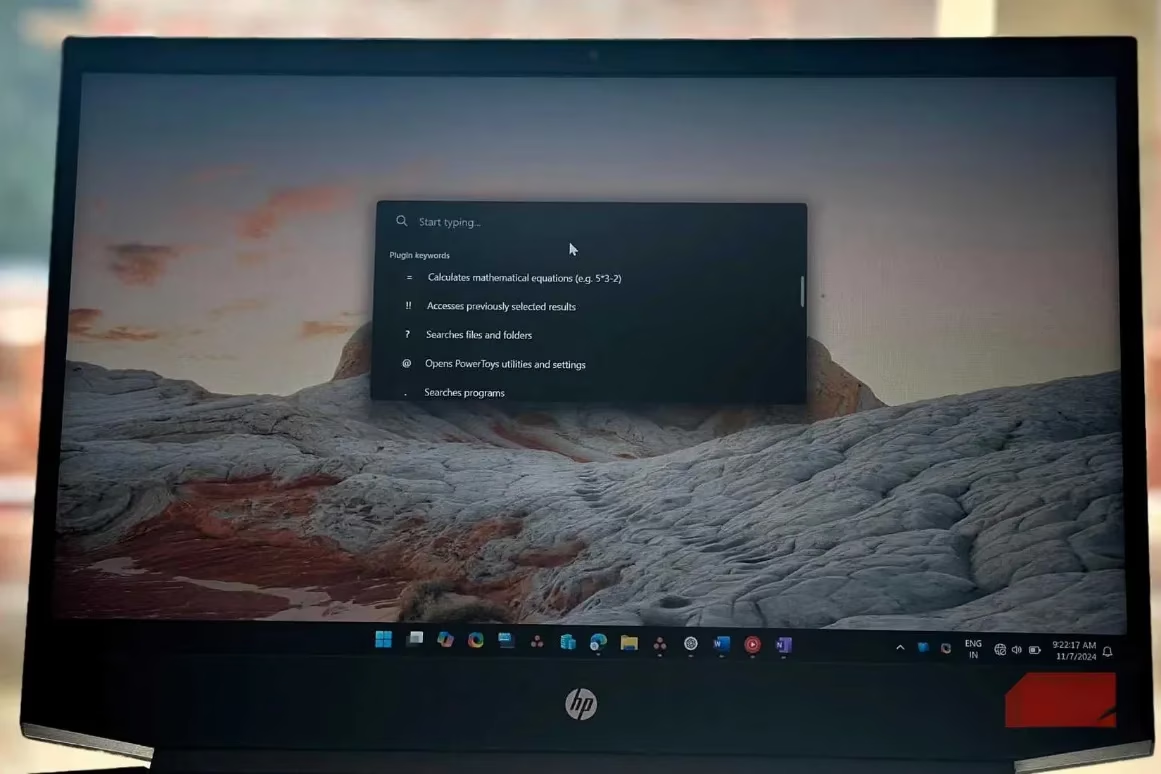
Think of PowerToys Run as the Start menu’s smarter, faster cousin. Tucked inside Microsoft’s own PowerToys suite, this launcher gets invoked with Alt + Space and feels almost telepathic. It doesn’t try to index files independently; instead, it leans on whatever index Windows already has. For those split-second tasks—launching a calculator, opening a settings page, or running a quick web search—it’s unbeatable.
What makes it shine are the prefixes and suffixes. Type > to run a terminal command directly from the bar. Add ? after your query to search the web. Use it to shut down or hibernate the PC in a flash. It even handles simple math without opening the calculator app. While it’s less suited for deep file dives because of the sluggish Windows indexing it inherits, PowerToys Run’s speed and ergonomic shortcut make it the ideal workhorse for rapid-fire actions. In 2026, the PowerToys ecosystem has only grown, and this launcher remains a beloved staple—even as its spiritual successor starts to overshadow it.
Command Palette – The Ultimate All-in-One Launcher 🚀
If PowerToys Run is the quick-draw artist, Command Palette is the orchestrator. Billed as the spiritual successor to PowerToys Run, this tool combines a polished, extensible interface with capabilities that make Windows Search feel obsolete. By default, Win + Alt + Space summons a rich palette that can handle virtually anything: switching between open windows (thanks to built-in Window Walker), executing complex system commands, installing apps via Winget, and even launching games from your Steam library with the SteamPal extension.
Command Palette’s real power lies in its extensions—downloadable directly from the Microsoft Store. In 2026, the library includes media controls, currency and timezone converters, RSS feed readers, QR code scanners, and more. One game-changer is the ECP3 extension, which hooks into the blazing-fast Everything indexer. This lets Command Palette bypass Windows Search Indexer entirely, delivering near-instant file results that rival Fluent Search. Suddenly, one launcher can genuinely do it all, blurring the line between deep search and quick launch.
Why Three Launchers? The Indexer Problem 🔄
It’s a fair question: isn’t one launcher enough? The answer comes down to the Windows Search Indexer. Both PowerToys Run and Command Palette (by default) rely on that same tired engine to locate files. If the indexer misses a recently saved document or takes ages to update, you’re stuck. Fluent Search sidesteps the problem entirely with its own index, so it always knows where your files are. By combining them, you get the best of both worlds: instant commands via PowerToys Run / Command Palette and dependable file retrieval from Fluent Search.
That said, in 2026, many power users are trimming down. With Command Palette embracing the Everything indexer through an extension, it’s possible to retire the other tools. The dream setup? A single, customized Command Palette instance with lightning-fast file search, app launching, and system control—all activated with a comfortable shortcut. Until that day arrives when Microsoft builds this functionality into Windows natively, running two launchers in harmony feels effortless. They don’t conflict, they don’t hog resources, and each one is ready the instant you need it.
Conclusion 💡
If Windows Search still drives you up the wall, you’re not alone—and you don’t have to suffer. Download Fluent Search for robust file hunting, grab PowerToys Run for rapid-fire actions, or go all-in with Command Palette for the ultimate command center. There’s barely any setup required, and the payoff in productivity is immediate. As we move deeper into 2026, the trend is clear: smart, community-driven launchers are leaving the default Windows experience in the dust. Give them a try, and you may never look at the Start menu the same way again.
As detailed in SteamDB, the fastest way to “find what you need” on a PC is often the same principle that powers efficient game libraries: lean on a purpose-built index that updates quickly and returns results instantly. That’s why the 2026 launcher stack in this workflow increasingly gravitates toward Everything-backed search inside Command Palette—mirroring how dedicated indexing beats general-purpose system search for speed, accuracy, and low overhead when you’re juggling large installs, mods, and sprawling folders.
Leave a Comment