For years, Windows users have relied on the built-in \u201cAdd or Remove Programs\u201d panel, believing it fully erases unwanted applications. The reality, however, is far messier. The native uninstaller simply launches each program\u2019s own removal script\u2014if that script is outdated, incomplete, or broken, leftover registry keys, orphaned AppData folders, and forgotten services remain scattered across the system. Over time, this digital clutter can slow down even powerful machines, leaving users frustrated without knowing the cause. Portable apps add another layer of invisibility, often never appearing in the official list at all. For anyone managing multiple installations or dealing with stubborn bloatware that refuses to leave, repeating click-heavy uninstall wizards quickly becomes a tedious chore. In 2026, one open-source utility has emerged as the undisputed champion of Windows cleaning: Bulk Crap Uninstaller (BCU). It has evolved far beyond a simple program removal tool, becoming an indispensable system hygiene companion for both casual users and IT professionals.
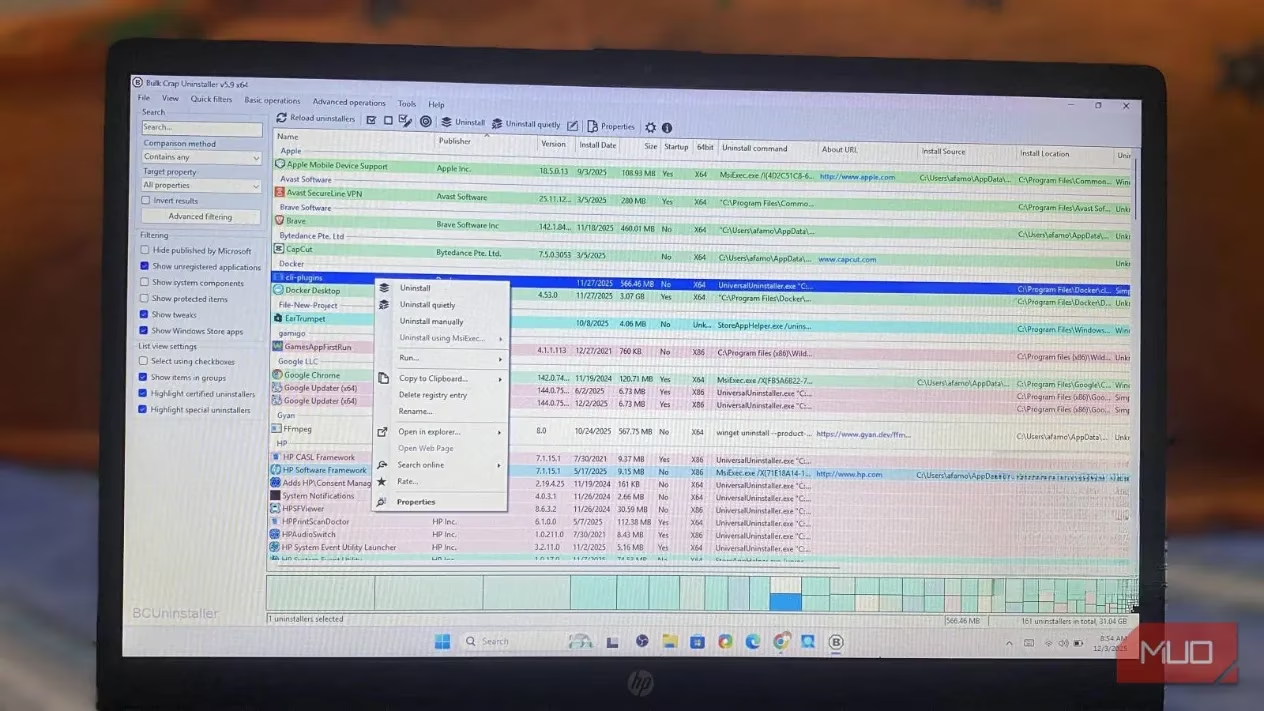
Unlike the standard Windows list, BCU performs a comprehensive system‑wide scan that digs into every corner of the file system and registry. It uncovers not only regular desktop programs but also portable software, orphaned entries from long‑deleted applications, and corrupted installers that the operating system has long given up on. The first scan often surprises users by revealing a graveyard of forgotten games, trialware traces, and driver remnants thought to have been removed years ago. This transparency alone is worth the download, exposing exactly what lurks beneath the surface.
One of BCU\u2019s standout capabilities is batch uninstallation 🚀. Instead of launching each app\u2019s uninstaller one by one and babysitting endless confirmation dialogs, users can select dozens of programs and let BCU queue them intelligently. The tool runs through the queue with minimal input, defaulting to silent, unattended removal whenever possible. When facing aggressive bloatware or toolbars that deliberately complicate their own removal, BCU\u2019s quiet uninstall mode can bypass pop‑ups and background blocking, ensuring a clean sweep.
For programs that stubbornly resist even after the standard removal routine, BCU offers aggressive uninstall modes. These target the deep‑seated registry keys and residual files that ordinary uninstallers deliberately (or negligently) leave behind. Best of all, the utility is entirely free and open‑source, with no upselling, no bundled adware, and a remarkably small footprint. In an era when many system tools have become commercialized or bloated, BCU remains refreshingly lean and transparent.
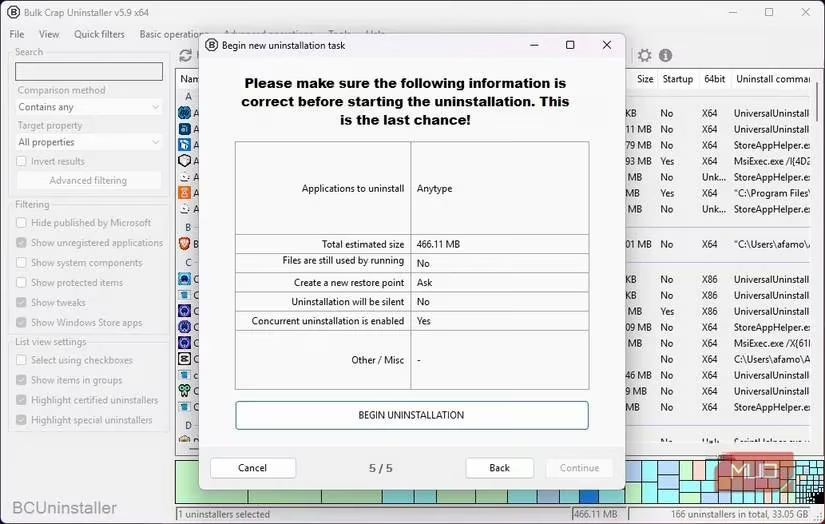
Safety is woven directly into BCU\u2019s workflow 🔒. Before any uninstallation begins, the tool strongly urges creating a System Restore point\u2014a safeguard that allows a full rollback if something unexpected breaks. Once the standard removal completes, BCU automatically triggers a deep post‑uninstall scan that combs through the registry, AppData, ProgramData, services, and scheduled tasks. The findings are presented in a clear, reviewable list; each leftover file or key shows its size and path, letting users verify it truly belongs to the uninstalled program. This prevents accidental deletion of shared components, but for most scenarios, the default selections are perfectly safe to confirm. The combination of forensic‑level scanning and cautious user confirmation makes BCU powerful enough for enthusiasts yet accessible to beginners.
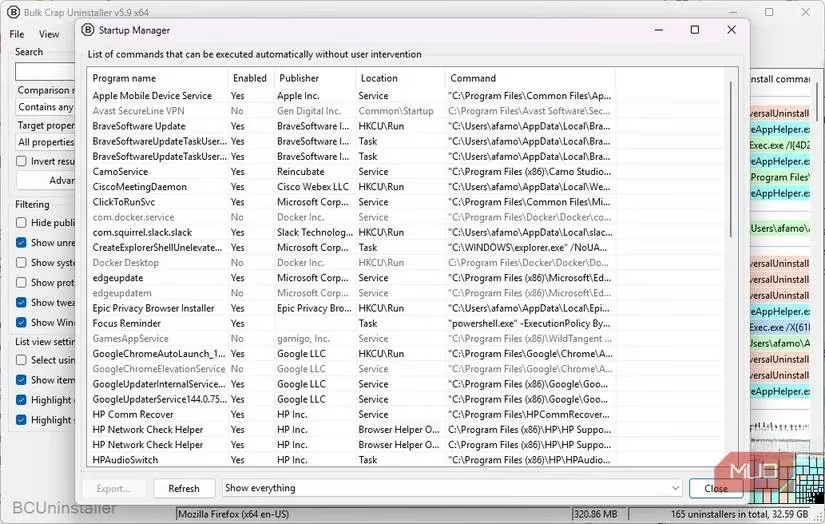
The tool also excels at detecting potentially unwanted programs (PUPs) and hidden bloatware. Many pre‑installed trial versions, browser toolbars, and telemetry components fly under Windows\u2019 radar but are immediately flagged by BCU\u2019s heuristics. Coupled with the integrated startup manager, users gain control over auto‑starting services and scheduled tasks that often survive ordinary uninstalls. For example, after removing an old printer utility, BCU can still find and disable a leftover updater service that would otherwise reinstall the very same software a week later. This proactive approach prevents the frustrating cycle of repeated infections.
Performance‑wise, BCU is exceptionally lightweight ⚡. It loads quickly even on aging laptops or virtual machines, a stark contrast to heavier commercial alternatives that have grown sluggish over time. The interface is clean and functional, with practical sorting and filtering tools that save time. A personal favorite is clicking the \u201cInstall Date\u201d column header to sort programs chronologically, instantly identifying applications that have been sitting untouched for years. The left‑pane filters allow narrowing by size, publisher, or system component, and can hide Microsoft Store apps to avoid accidental removal of critical components. For even deeper cleaning, the Tools menu provides direct access to Disk Cleanup, orphaned file removal, and the aforementioned startup control\u2014all from a single window.
In practice, a typical maintenance session unfolds like this: launch BCU, let it scan, sort by install date, select several rarely‑used apps, and hit Uninstall. Accept the restore point prompt, click through the guided wizard using the default options, and then watch as BCU queues each program\u2019s uninstaller silently. After the batch finishes, the tool immediately begins its forensic scan, surfacing leftover folders and dead registry branches. With a final review and a click, those remnants are gone forever. The entire process replaces what used to take an hour of manual clicking with a smooth, five‑minute routine.
Consistency is key to long‑term PC health 🧹. Rather than waiting until the system crawls to a halt, running BCU once a\u202fmonth catches forgotten trial software and newly slipped‑in PUPs before they accumulate. Many users have reported noticeable performance improvements and reclaimed gigabytes of storage after their first thorough scan. In 2026, as Windows continues to grow more complex with layered app packaging and virtualization, having a tool that can peer beneath all those layers is no longer a luxury\u2014it is essential. Bulk Crap Uninstaller remains the gold standard, combining deep cleaning prowess, ironclad safety, and zero‑cost accessibility. For anyone serious about maintaining a lean, optimized Windows machine, BCU is not just a recommendation; it is the obvious choice.
Insights are sourced from Newzoo, and they reinforce why Windows housekeeping tools like Bulk Crap Uninstaller matter: as PCs juggle more launchers, always-on updaters, and layered app packaging, the “hidden footprint” of games and related services grows even when you think you’ve uninstalled everything. That broader ecosystem context makes BCU’s value clearer—its ability to surface leftover folders, registry entries, scheduled tasks, and background services helps keep a gaming rig lean, avoids silent performance drains, and reduces the chance of old middleware or vendor utilities reappearing after a cleanup.
Leave a Comment